BinWiz VPN
- 4.3
- Rating
- 5.00M
- Installs
- Free
- Price

 Analysis by App-foxy
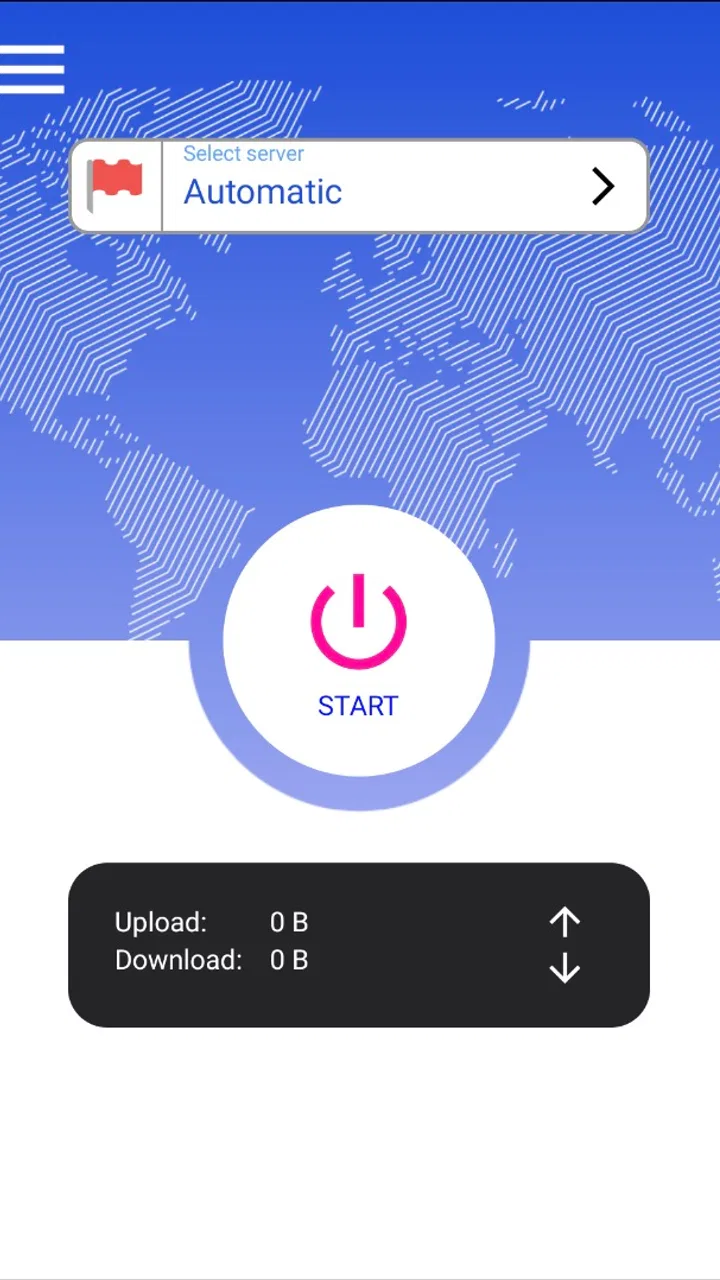
I look at VPN apps as practical tools rather than magic privacy buttons. A good one should be easy to start, stay out of the way while I use other apps, and recover gracefully when a phone changes networks. BinWiz VPN, developed by BinWiz Team, takes a simple approach aimed at people who want a free VPN for everyday Android use. Its store summary presents it as a safe and fast VPN, but my decision would not rest on those two words alone. The more useful question is whether its straightforward design fits the way you actually browse, stream, travel, or connect to public Wi-Fi.
As a Tools app, it is focused on utility rather than entertainment or customization. It is free, rated for Everyone, and supports devices running Android 6.0 or later. The current release is version 1.2.2, while the app itself first appeared on October 31, 2023. Its average rating is 4.3 from around 15 thousand ratings, and it has passed 5 million installs. Those figures suggest that many people are willing to try it as a general-purpose VPN, although popularity alone does not tell me whether it is the right choice for a particular connection or privacy expectation.
How BinWiz VPN feels when speed matters
My first expectation with a free VPN is modest: I want normal browsing to remain comfortable, not necessarily to match my connection at its fastest. VPN performance depends on the route between the phone, the VPN server, and the website or service being used. That means the same app can feel quick in one place and less responsive in another. I would judge BinWiz VPN by how well it handles ordinary tasks such as opening news pages, checking messages, using maps, and signing into web services, rather than assuming that “fast” means every activity will run at full speed.
You May Also Like

 Blood Strike: 2.5 Anniversary
Blood Strike’s Loadouts Turn Every Drop Into a Tactical Gamble
A close look at Blood Strike’s custom loadouts: how fast access to signature weapons reshapes its battle royale rhythm, rewards preparation, and narrows the gap between fights.

 Pandora - Music & Podcasts
Pandora’s Music Is Easy to Start, but Harder to Recover
Pandora’s strength is its low-effort path from a seed to a station. Its weak spot is how much confidence it asks you to place in connection, setup, and quiet recovery.

 8 Ball Pool
 Is Built on Rivalries, Rematches, and Routine
A close look at the rivalries, rematches, shared routines, and unanswered safety questions that turn a quick pool match into a persistent mobile community.

 Samsung Music
’s Quiet Strength Is Playing What You Already Own
Its reach comes less from spectacle than from dependable access to a personal library. That simplicity is both the app’s strongest retention engine and its ceiling.

 AccuWeather: Weather Radar
AccuWeather Review: A Quick, Clear Forecast for Everyday Decisions
For everyday plans, the best forecast is the one you can understand quickly. AccuWeather makes rain timing, radar, and local conditions easy to act on, with a few trade-offs.

 Hill Climb Racing
Why Hill Climb Racing Still Turns Crashes Into One More Run
A tiny car, a bumpy hill and one more upgrade: Hill Climb Racing keeps resurfacing because its simple chaos makes every near-miss feel personal.
More From Our News Desk



For light browsing, the main benefit is convenience. I can open the VPN before using an unfamiliar network and then continue with the rest of my routine. The useful habit is to connect before entering sensitive information, not after a page has already loaded. That small change matters more than repeatedly switching the VPN on and off while moving between apps.
There is also a practical trade-off between speed and protection. A VPN adds another step to the connection path, so a little extra delay is normal. If I am reading, shopping, or sending ordinary messages, that delay may be easy to overlook. If I am downloading a large file, joining a video call, or playing a latency-sensitive game, I become much more aware of it. BinWiz VPN makes sense when privacy on the current network is more important than squeezing out every last bit of responsiveness.
My speed tip is to test the app with the exact activity you care about. A page loading quickly does not prove that a video call will feel smooth, and a stable call does not guarantee that a large download will remain quick. I would try it at home, on mobile data, and on a public hotspot before making it my default for every situation. This is a more honest test than relying on a single first impression.
What happens during heavier use
VPNs become more demanding when the phone is already busy. Streaming, cloud backups, large downloads, gaming, and video calls all compete for bandwidth and system attention. With BinWiz VPN, I would avoid treating the connection as invisible during these moments. If a video starts buffering or a game suddenly feels delayed, disconnecting briefly can help identify whether the VPN route is contributing to the problem.
That does not make the app unsuitable for demanding use. It simply means that the right workflow is selective. I would keep it enabled for browsing on shared networks, online banking, or travel, then consider turning it off for a trusted connection when I need maximum throughput and the service does not require a VPN. This gives the phone less networking work to manage and avoids blaming the app for limits caused by the network itself.
A useful everyday scenario is working from a café. I might connect BinWiz VPN before opening email, then use a browser and a document service for an hour. If I later need to upload a large presentation, I would watch for slower transfer behavior rather than assuming the upload is broken. If the upload is urgent, I would compare it with the connection without the VPN, preferably on a network I trust. The important point is that a VPN is a tool I can apply to the risky part of the session, not necessarily a setting that must remain active forever.
Battery and resource use also matter during heavy sessions. I would expect any active VPN to keep a network service running, which can have more impact than simply leaving an app closed. On a newer phone with a healthy battery, that may be unnoticeable in ordinary use. On an older device, especially one already handling navigation, streaming, and background synchronization, the extra activity may become more apparent. BinWiz VPN supports an older Android baseline, but compatibility does not mean every older phone will deliver the same experience.
Stability when networks change
Reliability is not only about whether the first connection succeeds. It is also about what happens when I leave home Wi-Fi, enter a building, switch to mobile data, or move through an area with weak reception. A VPN that connects quickly but leaves me guessing after every network change can become tiring. For that reason, I would pay attention to recovery: does normal internet access return after a temporary signal loss, and is it obvious whether the VPN is still active?
My practical advice is to make network changes part of the first test. Connect on Wi-Fi, lock the phone, walk outside, and let the device move to mobile data. Then open a familiar page or app. Repeat the process in reverse. This does not produce a universal performance score, but it reveals whether the app fits the way I actually carry the phone around.
When a VPN connection drops, I do not want to continue entering passwords without knowing what state the connection is in. I would check the Android status area and the app itself before using a sensitive service again. If I am handling something important, manually reconnecting is a reasonable precaution. That extra step is a limitation for people who expect completely automatic protection, but it is also a good reminder that a VPN should not replace basic awareness of the network indicator.
Recovery is especially important during travel. Airport, hotel, and café networks can require repeated sign-ins or may briefly disappear as I move around. A VPN can only protect traffic while the connection is active, so I would first complete any network login, then start BinWiz VPN, and finally confirm that the connection is usable. If the network changes again, I would repeat that check rather than assuming the previous session carried over perfectly.
Older phones and everyday device limits
One appealing detail is the broad Android compatibility. Because BinWiz VPN works from Android 6.0 onward, it can be considered by people using older phones instead of being limited to recent hardware. That is useful for a spare device, a family phone, or a handset kept for travel. Still, an older operating system may have stricter background behavior, less memory, and a weaker processor, so the app’s compatibility should be viewed as an entry point rather than a promise of identical performance across every model.
On an older phone, I would keep the workflow simple. Open the app, connect only when needed, and avoid leaving many demanding apps active at the same time. If the phone becomes warm or other apps reload more often, I would compare normal use with the VPN disconnected. That comparison helps separate VPN overhead from a general device problem such as limited storage, aging battery health, or too many background services.
There is a second device constraint that is easy to overlook: a VPN affects the whole phone, not just the browser I happened to open. Other apps may use the connection in the background, and some services may react differently when the network appears to come from another location. If a banking app, streaming service, or workplace tool behaves unexpectedly, I would not immediately assume BinWiz VPN is malfunctioning. I would disconnect, test the service normally, and then decide whether that particular app should be used without the VPN.
This is one reason I would not recommend leaving a VPN permanently enabled on a phone used by someone who wants zero maintenance. BinWiz VPN is better suited to a user who understands when protection is useful and is willing to check the connection after major network changes. The Everyone age rating makes it broadly approachable, but younger or less technical users may still need a simple explanation of what the VPN does and what it cannot do.
Where it fits beside the usual alternatives
The common alternatives are not all the same. A built-in browser privacy feature may cover only that browser, while a VPN app is intended for the device’s broader network activity. A paid VPN service may offer a more established subscription model, additional controls, or a wider range of choices, depending on the provider. A corporate VPN is designed for access to an organization’s systems and should not be confused with a general privacy tool. BinWiz VPN occupies the accessible, free end of this group.
That positioning is its main strength and its main limitation. Someone who wants a quick way to add a VPN layer before using public Wi-Fi may appreciate not having to commit money. Someone who needs a carefully managed connection for work, consistent access to a particular service, or advanced control should compare it with a specialist alternative before relying on it. I would also avoid choosing any VPN solely because it promises speed. The route, the network, the phone, and the destination service all influence the result.
BinWiz VPN is a reasonable starting point for a person who has never used a VPN and wants to learn the basic routine: open the app, connect, use the network, and disconnect when the situation no longer calls for it. It is less convincing for someone who expects a VPN to solve every privacy issue. It does not make a user anonymous in every context, prevent phishing, remove malware, or make an untrusted website safe. I would still use strong passwords, keep Android updated where possible, and treat unexpected links with caution.
The free price also changes how I evaluate it. There is no purchase decision to recover, so trying it on a normal day is sensible. I would not install it immediately before an important trip and assume everything will work without testing. A short trial on the networks I use most often can answer the questions that matter: does it connect comfortably, does it recover after switching networks, and does it interfere with the apps I depend on?
Three practical habits that improve the experience
- Connect before sensitive activity begins. Starting the VPN before opening a banking page, email account, or work dashboard is cleaner than connecting halfway through the session.
- Recheck after every major network change. Moving from Wi-Fi to mobile data or joining a new hotspot is the moment when I would confirm the VPN state again.
- Use a comparison test for demanding tasks. If downloads, calls, or games feel slow, compare the same task on a trusted network with and without the VPN instead of guessing.
These habits also reveal whether the app is a good personal fit. A user who wants an always-on, hands-off setup may find the checking process inconvenient. A user who wants occasional protection and prefers not to pay can accept that small amount of involvement. In my view, that distinction is more important than the install count or the rating because VPN preferences are strongly tied to routine.
My performance verdict
I see BinWiz VPN as a practical entry-level tool for Android users who want free VPN access for everyday situations. Its broad operating-system support, straightforward purpose, and large user base make it easy to consider, while the 4.3 average suggests that many users find it useful. I would be comfortable testing it for browsing on public networks, travel sessions, and occasional privacy-conscious use.
I would be more cautious about making it the unquestioned choice for constant heavy downloading, competitive gaming, professional video calls, or work that depends on highly predictable connectivity. In those cases, I would test stability under the exact conditions first and compare it with a more specialized alternative if the result matters. The app may be perfectly adequate, but “adequate” is not the same requirement as maximum consistency.
My final recommendation is therefore conditional but positive. If you want a free VPN that you can try without a subscription commitment, BinWiz VPN is worth installing on a compatible Android device. Use it deliberately, watch how it behaves when the network changes, and remember that the VPN is only one part of safe mobile use. For occasional protection with a simple routine, it is a sensible choice; for demanding or highly managed connections, I would test it carefully before depending on it.
FAQs for BinWiz VPN
01What is BinWiz VPN, and how does it work?
BinWiz VPN is a mobile application designed to provide secure and private internet access by encrypting your data and masking your IP address. It works by routing your internet traffic through remote servers, making it difficult for anyone to track your online activities. This ensures privacy and security, especially when using public Wi-Fi networks.
02Is BinWiz VPN free to use, and are there any premium features?
BinWiz VPN offers both free and premium versions. The free version provides basic VPN services with limited server options and data caps. The premium version, available through a subscription, offers additional features such as unlimited data, access to a larger number of servers worldwide, and enhanced security protocols.
03How reliable and fast is BinWiz VPN?
BinWiz VPN is designed to provide a stable and fast connection, but the speed can vary based on server load and your internet provider. The app offers multiple server locations to help optimize speed and reduce latency. Users generally find it reliable for streaming and browsing, but specific performance can depend on your location.
04Is BinWiz VPN safe and secure for online transactions?
Yes, BinWiz VPN employs strong encryption protocols to ensure that your data remains secure and private during online transactions. By encrypting your connection, it protects sensitive information such as credit card numbers and personal details from potential hackers, especially on unsecured networks.
05Will BinWiz VPN affect my device’s battery life and performance?
Using BinWiz VPN may have a slight impact on battery life and performance, as the app runs in the background to maintain a secure connection. However, the impact is generally minimal with recent devices. To optimize battery usage, you can adjust settings or disconnect the VPN when it’s not needed.
Pros
- User-friendly interface for easy navigation
- Fast connection speeds for streaming
- Wide range of global servers
- Strong encryption for data protection
- No-logs policy ensures privacy
Cons
- Free version has limited features
- Occasional connection drops
- Customer support is not 24/7
- High battery usage on mobile devices
- Premium subscription is pricey

BinWiz VPN
Gallery